
Every cloud instance you have ever rented, every VM on your laptop, and a growing share of the computers inside modern cars are running on top of a hypervisor. It is one of those pieces of infrastructure that is everywhere and rarely explained properly — so people end up knowing the word, knowing that “Type 1 is bare metal”, and not much underneath that. This article goes under it.
What a hypervisor actually is
A hypervisor is software that lets one physical machine run several independent operating systems at the same time, each believing it has the hardware to itself. The other name for it — Virtual Machine Monitor, or VMM — describes the job better: it monitors and mediates everything a guest operating system tries to do to the hardware.
That mediation is the whole trick. An operating system is written on the assumption that it owns the machine. It expects to configure the MMU, handle interrupts, talk directly to devices, and execute privileged instructions whenever it likes. Run two of them on one processor without supervision and they will immediately corrupt each other.
So the hypervisor gives each guest a convincing illusion: virtual CPUs, a virtual memory map, virtual devices. The guest issues a privileged instruction, the hardware traps into the hypervisor, the hypervisor decides what should happen, and control returns. The guest is none the wiser.
The problem it was invented to solve
Virtualization is not new — IBM shipped it on mainframes in the 1960s, where the motivation was simple: the hardware was extraordinarily expensive and leaving it idle was waste.
The same argument returned to commodity servers in the 2000s. A physical server running one application typically sat at single-digit CPU utilisation, yet still consumed a full rack slot, a full power draw and a full cooling budget. Consolidating ten such workloads onto one machine turned that waste back into capacity. Every public cloud you use today is that idea, industrialised.
But consolidation is only the first reason. The others matter just as much in practice:
- Isolation. A kernel panic in one VM does not touch its neighbours. For mixed-criticality systems this is the entire point.
- Encapsulation. A VM is a file. It can be snapshotted, cloned, moved to another host, or rolled back after a bad change.
- Hardware independence. The guest sees virtual devices, so it can be migrated onto physically different hardware without reinstalling.
- Running incompatible things together. Legacy software that needs an ancient kernel can share a machine with something modern.
Architecture: how the illusion is maintained
Privilege levels
x86 processors define four privilege rings. In practice two are used: ring 0 for the kernel and ring 3 for user applications. Privileged instructions — loading page tables, masking interrupts, touching control registers — only execute in ring 0.
A hypervisor needs ring 0 for itself. So the guest kernel, which was written expecting ring 0, has to be pushed somewhere less privileged. That displacement is the root of every difficulty in virtualization, and the three classic answers to it define the field.
Trap-and-emulate, and why x86 broke it
The textbook approach is trap-and-emulate. Run the guest kernel at reduced privilege. When it attempts a privileged instruction, the CPU faults, the hypervisor catches the fault, emulates what the instruction should have done to the guest’s virtual state, and resumes.
In 1974 Popek and Goldberg set out the formal requirement: every sensitive instruction must also be privileged, so that none can slip past without trapping. Classic x86 famously failed this test. Around seventeen instructions were sensitive but not privileged — they behaved differently depending on privilege level yet executed silently instead of faulting. POPF is the standard example: in ring 0 it modifies the interrupt flag, in ring 3 it quietly ignores that part. No trap, no chance to intervene, and a guest kernel that thinks it disabled interrupts when it did not.
Three workarounds emerged:
- Binary translation. Scan guest kernel code before execution and rewrite the problematic instructions into safe equivalents. This is what made VMware’s early products possible on hardware that could not support virtualization properly. It works, and it is a formidable engineering achievement, but it costs performance and enormous complexity.
- Paravirtualization. Stop pretending. Modify the guest kernel so it knows it is virtualized, and have it call the hypervisor deliberately through hypercalls instead of executing privileged instructions. Faster and far simpler — but it requires source access to the guest, which rules out closed operating systems. Xen made this approach famous.
- Hardware-assisted virtualization. Fix the processor. This is what actually won.
Hardware assistance
Intel VT-x and AMD-V, both arriving around 2005–2006, added a new execution mode beneath ring 0. The guest runs in VMX non-root mode, where it can use ring 0 normally — but any operation the hypervisor cares about causes a VM exit into VMX root mode, where the hypervisor runs.
The guest’s complete CPU state lives in a control structure in memory — the VMCS on Intel, the VMCB on AMD — which the hardware saves and restores across those transitions. Binary translation became unnecessary. Unmodified operating systems could be virtualized at close to native speed.
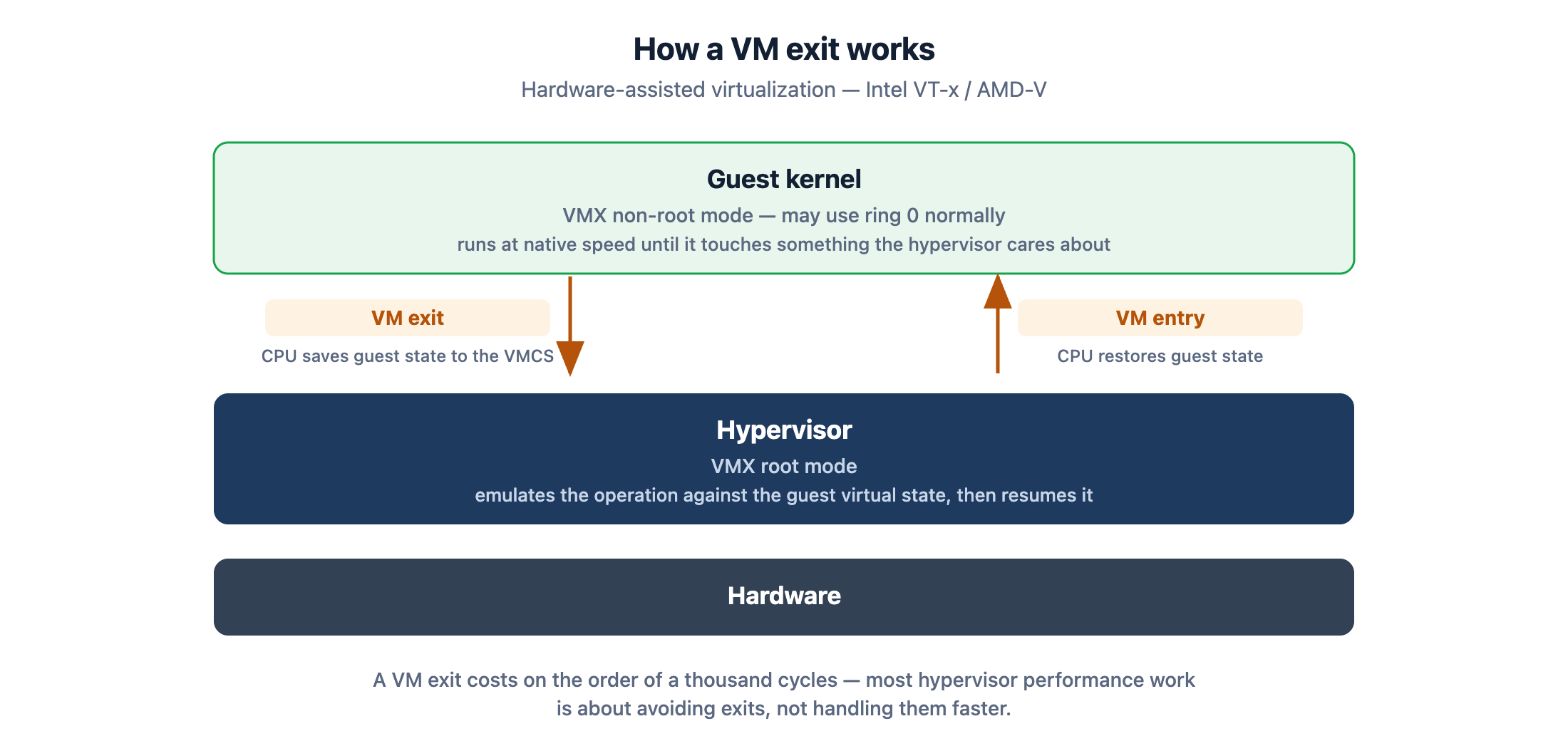
Those transitions are not free — a VM exit costs on the order of a thousand cycles — so much of modern hypervisor engineering is about avoiding them rather than handling them quickly.
Memory virtualization
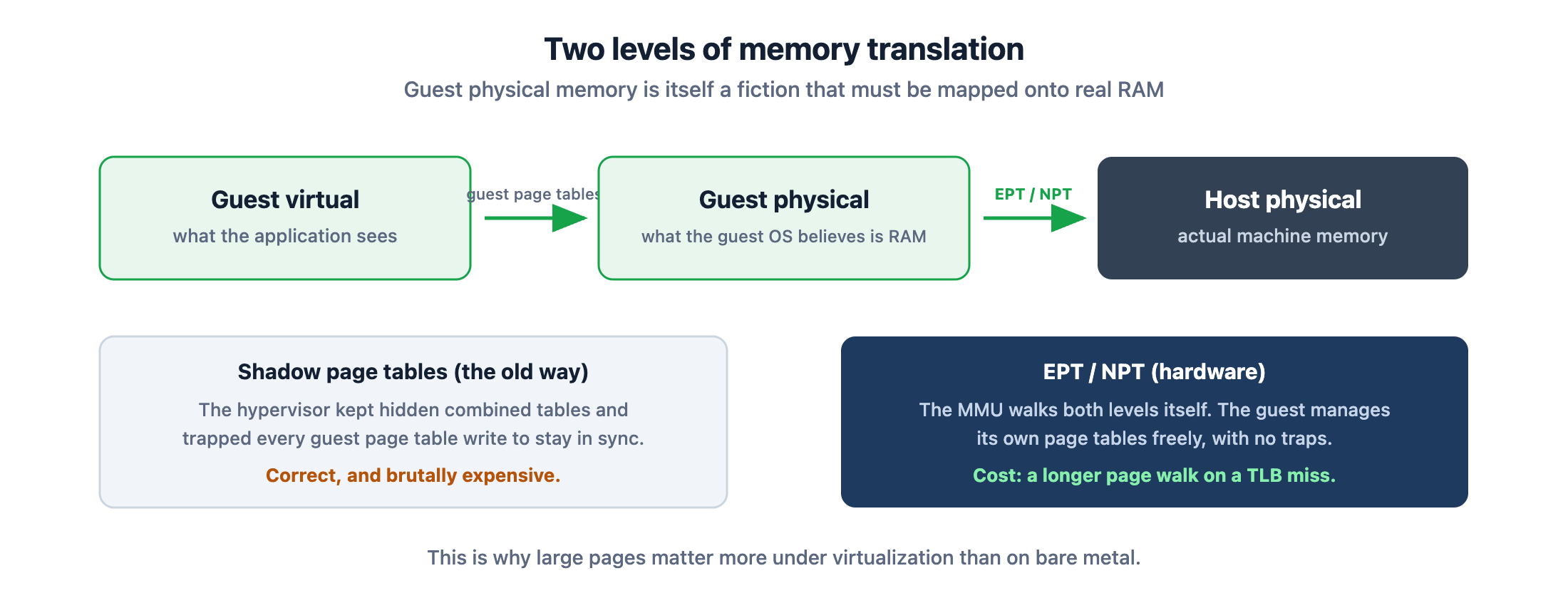
There is a second translation problem. The guest maintains page tables mapping its virtual addresses to what it believes is physical memory. But “guest physical” is itself a fiction that must be mapped onto real machine memory.
Early hypervisors solved this with shadow page tables: the hypervisor maintained its own hidden page tables combining both translations, and trapped every guest page table write to keep them synchronised. Correct, and brutally expensive.
Hardware fixed this too. Intel’s EPT (Extended Page Tables) and AMD’s NPT (Nested Page Tables) let the MMU walk both levels itself — guest virtual to guest physical, then guest physical to host physical. The guest manages its own page tables freely with no traps. The cost is a longer page walk on a TLB miss, which is why large pages matter more in virtualized environments than bare metal.
I/O virtualization
Devices are the third problem, and there are three approaches in ascending order of performance:
- Full emulation. The hypervisor imitates a real device — often a deliberately ancient one, because every OS already has a driver for it. Maximum compatibility, worst performance, because every register access traps.
- Paravirtualized drivers. The guest installs a driver written for virtualization, which communicates through shared memory rings instead of pretending to be hardware.
virtiois the standard here, and it is what you should be using in almost every case. - Passthrough. Hand a physical device directly to one guest using the IOMMU (Intel VT-d / AMD-Vi) to keep its DMA contained. Near-native speed, but the device belongs to that guest alone. SR-IOV softens this by letting one physical NIC present itself as many virtual functions.
The two types
The classification comes from Robert Goldberg’s 1973 thesis and turns on one question: what is underneath the hypervisor?
Type 1 — bare metal
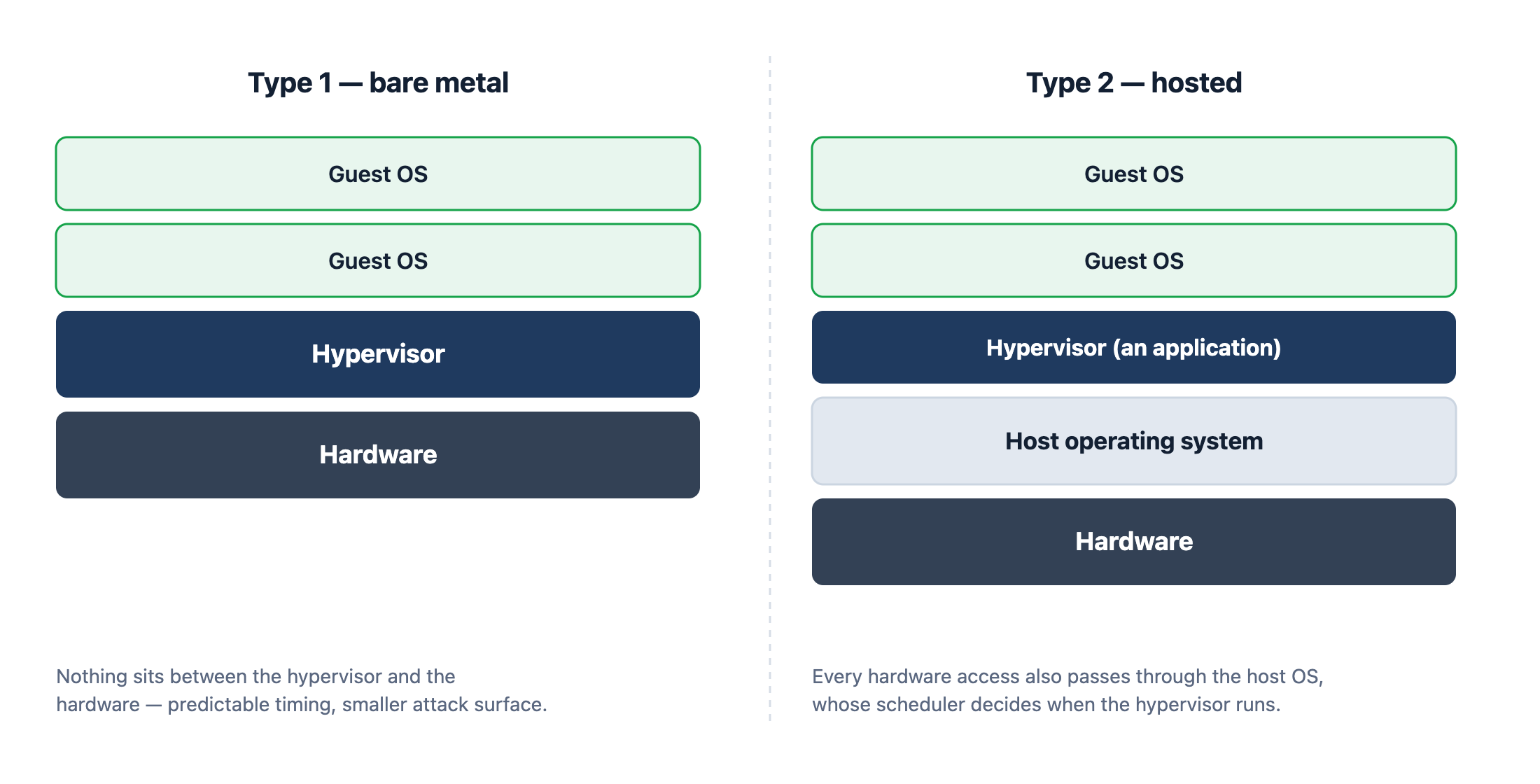
The hypervisor runs directly on the hardware. There is no host operating system; the hypervisor is the lowest layer of software, scheduling guests onto physical CPUs itself.
Examples: VMware ESXi, Xen, Microsoft Hyper-V, and the automotive and avionics hypervisors used in safety-critical systems.
The advantages follow from having nothing in the way: lower overhead, direct hardware access, a far smaller attack surface, and crucially, predictable timing. There is no general-purpose OS scheduler making decisions behind your back — which is why every hypervisor certified for a car or an aircraft is Type 1.
The cost is that it owns the machine. You need hardware on its compatibility list, and that machine does nothing else.
Type 2 — hosted
The hypervisor runs as an application on an ordinary operating system, alongside your browser and editor.
Examples: VirtualBox, VMware Workstation and Fusion, Parallels, QEMU on its own.
The advantage is convenience. Install it like any other program, use whatever hardware you already own, run VMs next to your normal work. For development, testing and training it is the obvious choice.
The cost is that every hardware access passes through the host OS as well, and the host’s scheduler decides when your hypervisor gets to run. Fine for a lab. Unacceptable for anything with a deadline.
Where KVM sits, and why the question is slightly wrong
KVM is the standard interview trap. It is a Linux kernel module, so Linux boots first — which suggests Type 2. But loading it turns the Linux kernel itself into a hypervisor with direct hardware access, which is Type 1 behaviour.
The honest answer is that KVM is a Type 1 hypervisor whose kernel happens to also be a general-purpose operating system, and the two-way taxonomy is older than the thing it is being asked to classify. Say that in an interview and you will do better than someone who picks a side and defends it.
Note also that KVM only provides CPU and memory virtualization. Device emulation comes from QEMU in userspace — which is why you nearly always see them named together.
Hypervisors are not containers
This confusion is worth clearing up, because the two get compared as if they were alternatives.
| Virtual machines | Containers | |
|---|---|---|
| What is virtualized | The hardware | The operating system |
| Kernel | Each guest runs its own | All share the host kernel |
| Boot time | Seconds to minutes | Milliseconds |
| Overhead | Hundreds of MB per guest | Megabytes |
| Isolation boundary | Hardware-enforced | Kernel namespaces and cgroups |
| Guest OS choice | Any | Must match the host kernel |
A container is a process with a restricted view of the system. A VM is a machine. The isolation difference is not a matter of degree — escaping a container means finding a kernel bug, while escaping a VM means defeating hardware-enforced boundaries. That is why multi-tenant clouds still put VMs between customers, and run containers inside those VMs rather than instead of them.
Hypervisors in embedded systems
Virtualization is no longer only a data-centre concern, and this is where it gets interesting for embedded engineers.
ARM added virtualization extensions with a dedicated exception level, EL2, sitting above the kernel’s EL1 — the architectural equivalent of VMX root mode. Stage-2 translation provides what EPT provides on x86.
The driving use case is mixed criticality. A modern car’s cockpit controller may need to run an Android instance for infotainment and a real-time OS for the instrument cluster on the same SoC. The infotainment stack is large, frequently updated and cannot be fully trusted. The cluster must display a brake warning within a hard deadline, every time, and is subject to safety certification.
A Type 1 hypervisor lets both share silicon while guaranteeing that a crash or compromise in the infotainment guest cannot affect the safety-critical one. One SoC instead of two ECUs, with the isolation boundary enforced in hardware.
These hypervisors look very different from ESXi: tiny code bases measured in thousands of lines, static partitioning rather than dynamic scheduling, and designed so the whole thing can realistically be certified against standards like ISO 26262.
Choosing between them
- Learning, development, testing on your own machine — Type 2. VirtualBox or your platform’s equivalent.
- Production servers and private cloud — Type 1. KVM if you are on Linux, ESXi if you want the commercial ecosystem.
- Real-time or safety-critical embedded — a certified Type 1 partitioning hypervisor. Nothing else qualifies.
- Packaging and scaling applications — probably containers, not a hypervisor at all. Ask whether you need a different kernel; if not, you likely do not need a VM.
Six things that are commonly got wrong
- “Type 1 just means bare metal.” True but incomplete. What matters downstream is the consequence: no host OS scheduler between you and the hardware, therefore predictable timing. That is the reason safety-critical systems mandate it.
- “KVM is Type 2 because Linux boots first.” Loading KVM turns the kernel itself into the hypervisor, with direct hardware access. The two-way taxonomy predates the design and does not classify it cleanly.
- “Virtualization overhead is mostly CPU.” On modern hardware the CPU is close to native. The cost is concentrated in VM exits and I/O; profile those rather than assuming a flat percentage.
- “Containers give the same isolation as VMs.” They do not. Escaping a container means finding a kernel bug; escaping a VM means defeating a hardware boundary. That difference decides architecture in multi-tenant and mixed-criticality systems.
- “Emulated devices are fine.” They are a compatibility fallback. Use virtio where you can, and passthrough with an IOMMU where you need throughput.
- “We can add partitioning later.” The most expensive assumption on this list. Partition boundaries, interrupt routing and worst-case latency shape the hardware and the software architecture, and retrofitting them is close to a rewrite.
Where this shows up in real products
Hypervisors stop being an abstraction the moment a product has to do two incompatible things on one piece of silicon. We see the same pattern repeatedly across client work:
- A cockpit or control unit that must run a rich Linux or Android stack for the user interface and a certified real-time OS for the safety function, on one SoC, without the first being able to disturb the second.
- A consolidation programme replacing several ECUs or controller boards with one more capable processor, where the isolation that used to come free from separate hardware now has to be re-established in software.
- A gateway or edge device where an updateable, internet-facing application partition sits alongside a partition that must keep running whatever happens to it.
These designs are unforgiving. Partition boundaries, interrupt routing, shared-device arbitration and worst-case latency all have to be reasoned about up front, because they are extremely difficult to retrofit once the board is built and the software is written.
That work sits exactly where our disciplines meet — silicon, board, firmware and the software above it. If you are weighing up whether to consolidate onto one SoC, or trying to make a mixed-criticality design meet its timing and certification targets, talk to our engineers.